3d

Mini update!

My original plan was to do a 40% scale version of my R2.

Well .. This plan has changed. The new plan is to make a 50% scale version of R2-D2.

Why the new format, you may ask? –Well, the slightly larger scale makes the details really pop out from the printer.

I can’t print the entire dome in one go, but I might as well split it in several parts. The first proper dome print was splitting the dome in half, and printing it in halves. It came out really well.

IMG_7049

It is quite thin at this point, but once ready, the parts really look good.

IMG_7059

It also means I need to print a complete new set of greeblies for the dome, and of course, the old 40% leg struts and parts done, needs to be remade as well.

IMG_7010 IMG_6995

I just think this is so cute.. 😉

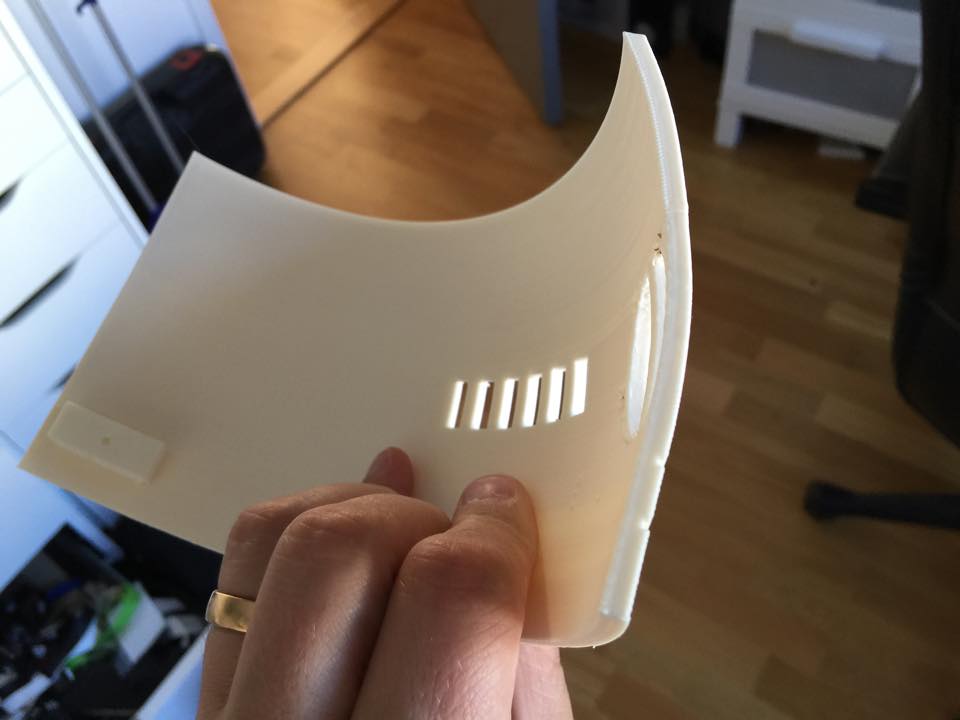
The second dome I made much thicker, and split in 4 parts. The main dome is in thirds, but I also cut off the top to print as one single part as well.

Much sturdier…
ThickerDome2 ThickerDome1


However, still fragile..

IMG_7482

Fortunately, this is an easy fix, and once I have acetone coated the insides, it should be sturdy and have no issues at all.


By |2016-12-06T00:00:17+01:00August 24th, 2015|Mini-R2|Comments Off on Mini update!

Data Panel!

So, A long long time ago in a galaxy far, far away.. I had temporarily mounted one of the inside panels of R2 with duct tape.

The circuitboard was assembled, held in place behind the panel by duct tape, the panel was unpainted, looked flat, and .. you guess it .. held in place by duct tape.

Not to mention the arduino running the program for the blinky lights…

Anyway: I figured that if I wanted this panel to be in my droid, I had to do something proper with it. I have not had it inside my R2 for a long time, and I had an idea what to do with it:

From this:

IMG_8256

To something like this:

DataPanelUSB

I have 4 arduinos in the body of my R2-D2, and easy access to them is something that I have long sought after…

First step was to start cutting up the panel..

IMG_2886.JPG

A while ago, I ordered a bunch of USB cables for panel mounting. I just needed to cut away some portruding things on the insides, and then I simply taped four of them together.

IMG_2887.JPG

Test fit behind the panel..

IMG_2889.JPG

It fits perfect!

However, I wanted to have something more, not just a long gaping hole with 4 USB’s, so I made a sort of bezel from 1mm styrene.

IMG_2901.JPG

A test fit, to see if it works, and how it looks..

IMG_2903.JPG

Just testing to see that the USB plug reaches in deep enough to sit properly. It does.

Next step was to drill up the holes where the connector should be properly, take the panel and bezel outside and paint the panel. Satin White, of course. The bezel, I decided to paint in R2 Blue. I needed to try something out.

I also designed and 3d printed a few distances for the circuitboard to go around the round LED’s at the bottom and to the right. Everything was hot glued in place and works like a charm.

For the LED’s up right, I cut up a piece of 1mm acrylics, drilled and riveted in place. The edges cracked when I did the riveting, but as I’m planning on weathering the panel, it really makes no difference.

IMG_2926.JPG

Time to weather the panel! I used the same method I used for the rest of my droid, but made this one to be a little more cleaner, as it is on the inside of the droid. I filthied it down with the remains of my old Citadel Paints: Chaos Black and Flesh Wash. Once really soiled, I used cotton pads and a solvent to clean off just enough to make it look clean..ish.

I also took some sanding paper and dulled down the clear acrylic, and banged on the acrylic with the handle of a screwdriver until it cracked a little more. It looks just the part.

IMG_2948.JPG

Something is still missing. The connector. It is just a slight engraving and some holes on this panel. I decided it needed something else. The research I’ve made suggests that it is a multi cable connector, and I drew one in Rhino3D and printed on my Makergear M2.

IMG_2949.JPG

Once done, I gave it a quick acetone vapor bath…

IMG_2947.JPG

… and finally hot glued it to the panel.

IMG_2950.JPG

MUCH better!

I still need to do a bit of work on the body of the droid to mount this in place, but I was so happy that I had to do a quick pic with the panel in place:

IMG_2951.JPG

Finally, a short youtube clip to show off what it looks like in action!

The inside of the panel is the next step with this part. I need to add ridges to mount the panel against, and also weather the inside of the hatch. That, however is work for another day! 😀

By |2016-12-06T00:00:22+01:00April 5th, 2015|R2-D2|Comments Off on Data Panel!

Octagon Volume Control part II

To continue from the last post , where I built the octagon volume control, It has now been installed in the droid.

I replaced the hollow mesh aluminium plate with black felt, to get a non-reflective, light absorbing surface behind the octagon port to obscure the insides, and also to not show the plastics holding the potentiometer into place. It did the job perfectly.

Also, as I showed earlier, I had to properly align the volume know in the middle of the cut away portion of the octagon port.

IMG_2529.JPG

Enter the lovely world of 3D printing. My digital caliper gave me the measurements I needed and 15 minutes later I had a perfect inside bushing for the knob.

IMG_2660.JPG

I had previously glued the knob in to place with rubber glue so it would be easy to remove. This time, the printed part is just squeezed inside the knob, and the knob is squeezed inside the 3d printed part. No glue needed and a perfect fit!

IMG_2661.JPG

It even looks centered!

By |2016-12-06T00:00:24+01:00March 23rd, 2015|R2-D2|Comments Off on Octagon Volume Control part II
Go to Top