Yearly Archives: 2015

Vicker Viscount Reading Light Mount

Some A lot of parts in Star Wars are based off existing parts. Once you start learning what things are, you keep on seeing the shapes and parts everywhere.

IMG_8251

One example, which is used on multiple places, is the series of metal ridges on the right hand side of R2, which can also be found on the chest box of Darth Vader.

Turns out these were the actual coin slot of a British 60’s phone box.

Spare parts from scrapped technology was quite common. A lot of the weapons used in Star Wars was based on second world war remnants, just modified to look better and cooler!

Microphone tips from a particular brand called Hovi have been used in Stormtrooper helmets, Biker Scout helmets, Communicators, and possibly more.

Dashboard from an old Volvo have been used as interiour in the Millennium Falcon, and most notably as control panels on Han Solo frozen in Carbonite.

The Imperial Uniforms had previously been seen in a 60’s Sci-Fi, and the boots used were either post-war East German marching boots, or British riding boots. Why re-invent the wheel?

However, this post is not about those, but about the “Holo Projectors” on R2-D2. The thing that broadcasts the message from Leia in Star Wars: A New Hope. Yes. That one.

IMG_7525

When you look at it, it is quite obvious that this part, is originally the reading light found in older air planes. In this case, from a Vickers Viscount 700-series aircraft.

A while back, my good friend managed to track down a few of these..

Vickers

Ledtråd1

..and sent me this one!

It has been sitting in a box for a long time, only brought out at some Sci Fi conventions and R2 Builder meetings to show other builders, but I felt it was time to get to work on making a proper display for it!

First up was getting all the grime off, which took a while. A lot of sanding to get dirt, sand and oxidation go, and then I started to work on the display bit.

I had a few sheets of clear acrylic laying about, and while the reading light was 65 mm in diameter, I had a hole drill that was just below that, so I figured it would be perfect!

Drilling up the big hole, followed by testing the mounting worked great.

Next up was deciding how I wanted it displayed.

I opted for a smaller display piece, and wanted protective acrylic both in front of and behind the reading light. Time for some cad!

Screenshot 2015-10-02 22.36.30

A corner bracket designed, and 3D printed..

After it all came together, it looks pretty nifty!

holodisplay1 holodisplay2 holodisplay3

This will be a nice display at the upcoming Stockholm Comic Con and Sci Fi conventions!


By |2016-12-06T00:00:05+01:00October 2nd, 2015|Building, R2-D2|Comments Off on Vicker Viscount Reading Light Mount

3D Printer Upgrade: Cable Chains

For a while, I wanted to change out the cable braids on my MakerGear M2 for chains, and now the work has been started!

Firstly, I found this nice model on thingiverse, tosdjuenfs Cable Chain: http://www.thingiverse.com/thing:40124

I printed out a bunch of those, first to test my PET, worked great, but I wanted them black, so back to the old ABS.

To mount them to the M2, I found another nifty mod on thingiverse by rklosinski: http://www.thingiverse.com/thing:151024.
Since I was not using a store bought chain, but rather my own, I downloaded the original Makergear part, and inspired by the thingiverse cable holder, I made my own version of it with a cable chain end point integrated.

I cut off part of the model in order to allow for this to be printed without supports, as well.

Screenshot 2015-09-12 20.32.14

Then I also needed to fasten the other end somehow. There is a very nice little hole near the edge where I’ve previously had a cable tie holding the Y axis cables in place. This was perfect for my needs. Now i just needed to draw and print a holder that was made for this task:

Screenshot 2015-09-12 20.22.09

Once I had printed enough links in the chain above, it was a simple matter to remove the braid and carefully thread the cables one by one (largest first) through the cable chain.
While doing this, I had them broken un into segments of 4 pieces, as this was easier to thread the cables through smaller segments.

There was one big 4MM bolt that helps holding the top plate to the steel frame that was a bit in the way, but I replaced this with a smaller screw that should normally be counter sunk, but it got the bolt low enough to allow the chain to pass over without issues.

Here’s the result of the Y-axis DONE!

IMG_8542
Now for fixing mounts for the heated bed and X-axis….

By |2016-12-06T00:00:06+01:00September 14th, 2015|3D Printing|Comments Off on 3D Printer Upgrade: Cable Chains

BB-8 Progress

Last time I left you hanging right after I’ve sanded and added Tamaiya Putty to my dome.

After I got back from a bit of well deserved vacation, it was time to (in very little time) try and get this as finished as I could in just a day to exhibit on the upcoming Science Fiction convention in Uppsala here in Sweden.

While being away on vacation, I got a nice package from my friend Michael Erwin in the US, who sent me a custom made lens for the holo projector for BB-8.

This.. looks MUCH better!

IMG_8514


A little bit of sanding and just a touch of glue to keep it in place for now, and this part is done! I still need to find a good dark grey paint and change the main colour, but the part itself is done!

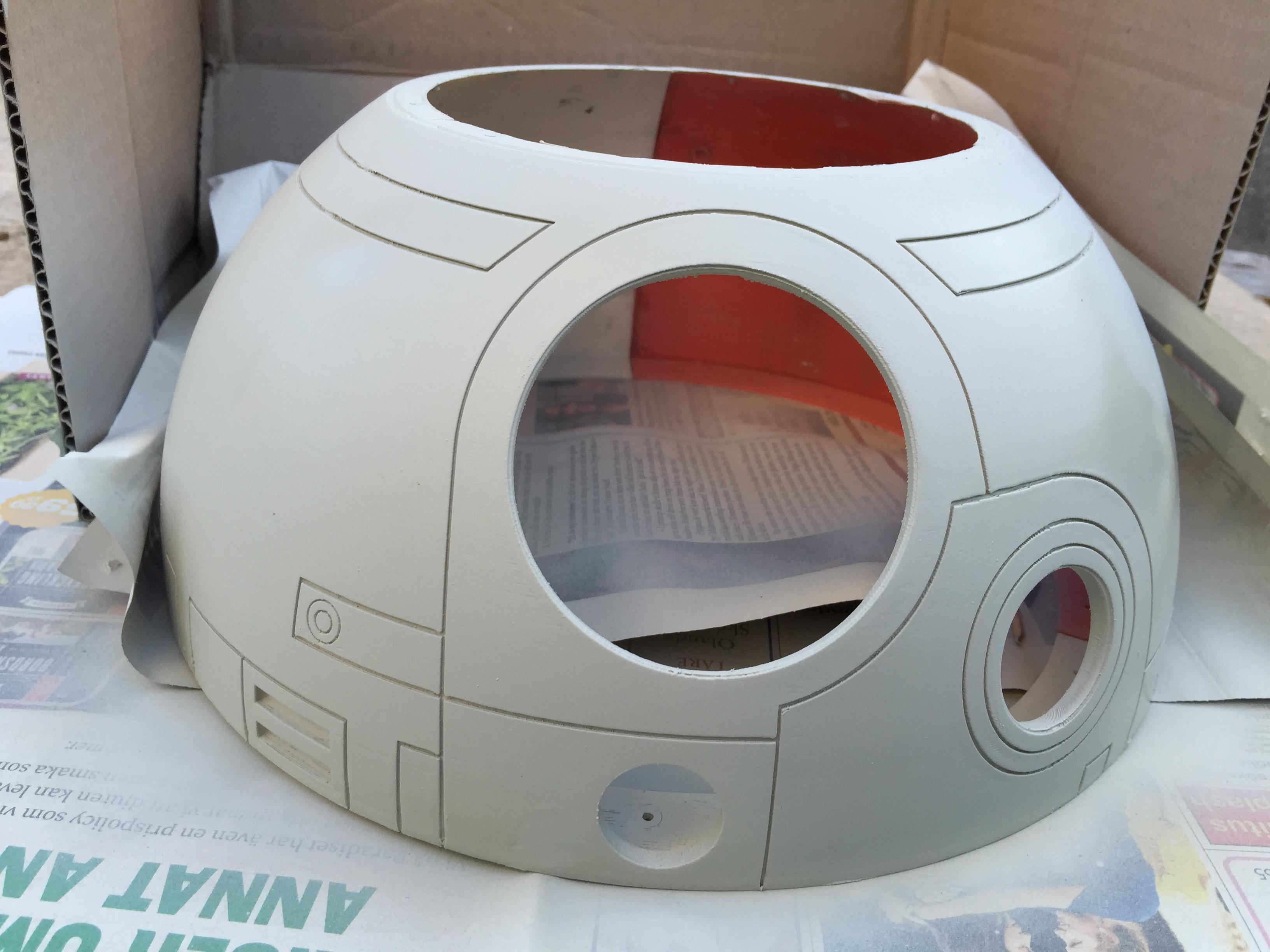
Next up was the dome. I knew I still had a few small blemishes here and there, and the joint between the dome thirds is not 100%, but I wanted to show something BB-8-ish at the convention, so off to the back yard and start painting!

IMG_8518

A bit of filler primer, and it looks a lot smoother all of a sudden.

Normally this is where I would wait for this to cure properly and then sand it down to basically nothing, but no time to waste!

As soon as the surface was dry, It was time to hit it with my Satin White!

IMG_8519

Not having enough time to wait for the paint to cure properly, next up was clear coating. Naturally I ended up with a little too much and it got a little runny in one spot. Fortunately, I managed to fix this pretty well, but even so, I am still going to sand this dome after a bit of putty on a few places, and then repaint it.

Next up was the Radar Eye.

IMG_8522

It does have a bit of texture from the print still, and I could fix this with a bit of filler primer, but to be honest, I like the extra texture. It gives a bit of depth to the overall look.

Even though I printed the Radar Eye insert at 0.05 mm layer height, and no sanding was done, as it looked just perfect in black ABS, I did still cover it with a thin coat of black paint, and subsequent clear coat.

IMG_8520

It just looks better and better. Can’t wait to put this all together!

Waiting for the pieces to dry, it was time to focus on other tasks. Making a lens for the PSI is one of those things.

The PSI lens should be small and round and sort of see thru, but milky white. A bit of clear acrylic will have to do!

IMG_8525

Away with the covering plastic and start cutting out the circle.

IMG_8526

Basically I cut a basic circle with my cutters. This was neither round nor pretty, but some thick sand paper and some patience solved this nicely.

Once sanded, I brought out some 600 grit sand paper and sanded the fronts and backs of the lens as well to give it a nice, milky, see through look.

IMG_8524

Yes, it was really a rough sort of roundish piece that has been sanded by hand to this shape. Honestly!

Time to do the Radar Eye lens!

Having ordered a couple clear acrylic 70 mm hemispheres (to allow for failure), I set up a blade from a break blade knife on a small pad of paper and clamped it all down real good. I then pushed the hemisphere down and against the blade white rotating it as I went along.

After the first attempt I found the proper height from the pad, and did it all over again, a bit more careful this time as well.

IMG_8544

Once I had cut through, I sanded off any rough edges through sanding on a flat sandpaper that was on my desk.

IMG_8545

Next up: I had a couple of red LED’s lying at home, and I carefully pushed them into the small portion of the Radar Eye insert, and put shrink hose on the legs and routed the legs through the Radar Eye housing.

A small 3 volt battery hooked up (actually, taped) to the LED and it gives us … this!

IMG_8540

It really gives a 2001 vibe, doesn’t it ?

I’m sorry Dave. I can’t do that…

Time to put it all together…

PSI insert was treated with a bit of silver rub and buff (after looking at pictures since, I realize this was a mistake, but I will fix that when things calm down a bit..

The Radar Eye was pushed in to the opening, same with the holo projector.

I actually glued the housing of a LED flash light on the back, so all I need to do in order to get it to lit up, is solder a few cables and attach a battery!

No time to fix the dome ring or the dome skirt for now. They area bit crooked, but I will print them over again at a later point.

Anyway, this is the result. Starting to really look as it should!

IMG_8530IMG_8528

IMG_8538


By |2016-12-06T00:00:06+01:00September 13th, 2015|BB-8|Comments Off on BB-8 Progress
Go to Top