Yearly Archives: 2012

Modified Electronics and New Coin Returns

Hello!

After a break where I’ve focused on other, more important things in life for a few days, I got around to do some more building today!

It felt good actually doing something again. Building is like therapy!

First off, I was given a few aluminum … thingies .. that works extremely well to divert heat from my motor controllers!

I purchased some thermal grease and took apart the motor controllers, added a healthy amount of grease, then added more grease to the aluminum surrounds, and finally screwed these to my new heat sinks!

My first version was to screw these on the insides, in order to have more space for cool air to cool these down, but I quickly realized that I would not be able to see the status LED’s on my motor controllers!

These will do fine, and allow plenty of air to pass through.

This should make the motors to not overheat so easily… hopefully!

A few days ago, I picked up a 0.8 mm thick aluminum plate, and decided to try and do something with my coin returns and vents. I had made one coin return before, and the idea was simply to exchange the from plate, which was styrene with aluminum tape, with proper aluminum.

I started marking out the pieces and started cutting them out. I used the same idea as for styrene. I scored with a sharp break-blade knife and a steel ruler, and this enabled me to bend the aluminum back and forth until it snapped and gave me a very clean edge.

I scored the edges where I needed to cut out, and also masked this off with tape, to (try) to keep the aluminum surface nice and clean. At this state, I drilled holes in the corners and I bent the plates using a scrap piece from the frame as guide, and checked with the placement on the droid.

Thin aluminum was not that hard to work with, and I decided to actually try and make the entire coin return out of aluminum. I printed out some templates, glued it on the aluminum and started cutting.

I used the knife to score the edges where I wanted to bend the aluminum.

The rounded parts, I sanded off with my dremel.

Since the aluminum was scored, bending it was rather simple, but I knew I would only have one chance on bending it. If I needed to bend it back and forth, it would snap. Since this is a small detail, it does not bother me that the coin returns are scored on the back, as it is facing inside the droid, and no one will ever see it.

As you can see, the aluminum is clearly weakened where it is bent, but I plan on filling this with putty anyway, and it is not a piece that will be in any stress anyway.

Testing on the rounded piece… Yep, fits good!

All three coin return innards done. One for the front and two for the back!

The sides will simply be made slightly too large and glued on.

Once the sides are in place, time to glue the entire innards on the front plate and superglue them together.. and then add platy of tamaiya putty in order to really fix them together.

… now I know what you’re thinking….

I did not forget to actually cut out the square from the front plate!

This is the front coin return, all in aluminum. Check out how good it looks on the test fit on the body:

Sure, it has a few minor things that are not perfect, but this is R2 we’re talking about. He should be a bit dented up and not pristine clear. I will do some more sanding and filing later on, but I think it looks good on him =)

Finally, I had to do a comparison shot in-between my old styrene coin return and the new all aluminum one:

A small detail, really, and I have a lot more to fix this week, so why did I focus on redoing something I’ve already done?

Well, why not? =)

I needed to start to learn how to work with the aluminum parts I need to make anyway…

//Micke

By |2016-12-06T00:01:36+01:00March 26th, 2012|R2-D2|Comments Off on Modified Electronics and New Coin Returns

Logic in the rear..

After cutting out the front logics with good results, it was time to repeat the process with the rear logic display.

Having carefully marked where to cut, it was time to put my trusty dremel to use..

Cutting aluminum really eats down on these cutting discs… Good thing it’s really easy and quick to replace them.

Two cuts down, two to go..

Ta-daa!

A little bit of filing, then time for a test fit… and it fits great!

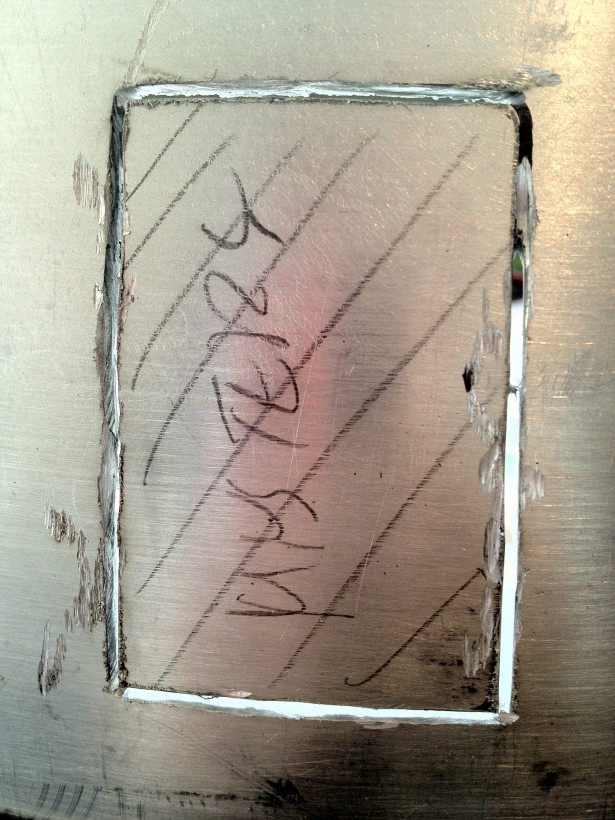
While being in the process of cutting, I decided to cut out the mystery panel form the dome.

Even though this is now cut out, until I actually make something of it, I can hide the cuts and glue the piece in place behind the frame with melt glue or something. I’ve got plans, but we’ll se how they go…

Next up, was to cut out the circular hole for the front Holoprojector. I have postponed this as it is scary, as it is part of R2’s “face” ..

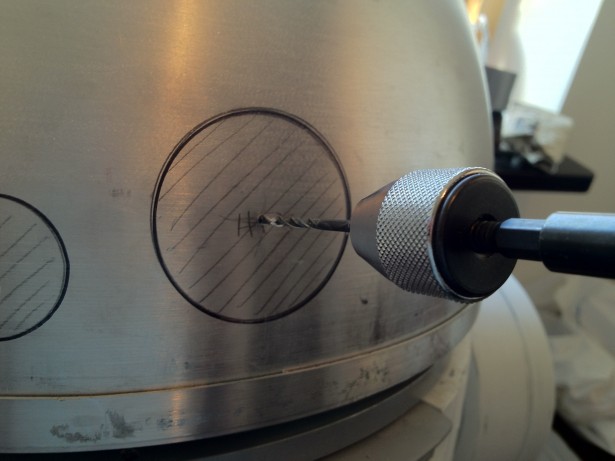
I started with finding the middle of the hole, and then drilling a small guide hole.

Not a bad start, but the hole needs to be slightly larger, I think..

So, mounting my hole drill, I started the process of cutting. This is not meant to drill the full hole, but merely a groove that I can use later on.

Groove done!

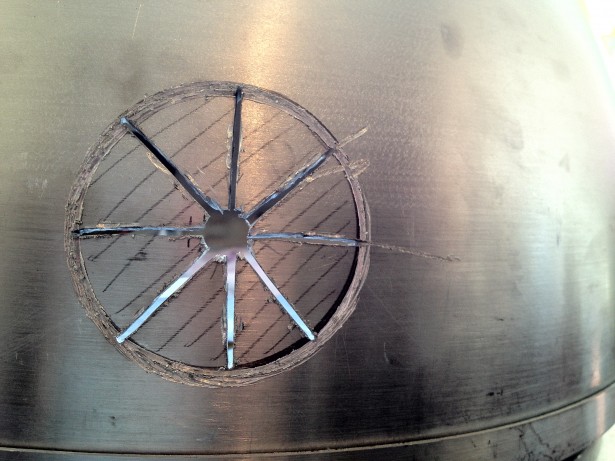
Now it’s time to bring out the dremel again, and cut open inside the material that is about to be removed.

Next step: Pushing the pie pieces inside, and then start removing them one by one by bending back and forth. Not very difficult.

However, for a second there, I found the evil side of R2…

Is that the death star eye, or R2 ? 😮

Hole pieces broken off, edges filed and sanded. Looks pretty round to me!

Looks like it will fit the holo projector holder as well! =)

This needs to be investigated further…

First time with electronics activated and all logic displays and front holo projector in action! *wieeeeee*

Only one final thing… Here’s a picture of a test with the mystery panel. I took a piece of plexiglass, sanded it lightly, and placed a piece of see-thru mylar on the back. The mylar is not stretched enough, as you can see in the picture, but it was only a test anyway.

I placed the front PSI behind the mylar, just to try it out… and with a diffuser and a light box, this can do very well!

If you prefer moving pictures, check out this video…

By |2016-12-06T00:01:37+01:00March 21st, 2012|R2-D2|Comments Off on Logic in the rear..

Cutting Logic

The time I’ve dreaded for so long was finally upon me.

There is no way back.

I need to cut open more of my dome in order to finish off my droid.

Today, the time came for the Front Logic Displays to be cut out!

As you may have seen on older pictures, these were already marked out on my inner dome:

Said and done, armed with my brand new dremel (an original one, not a cheap knockoff anymore…), I started cutting open the inner dome for the front logics.

It took a little while, but working slowly, the results were pretty good. After cutting them out, I test fitted the aluminum Logic Surrounds, and filed away until they had a nice fit.

Once that is done, it is time to add the logic surrounds..

This is a test fit with the outer panel in place as well, to make sure everything is in place.

I simply had to test with the outer dome in place, and this dome is not joined, so it is not in exact position, but I had to take a look.. So, I added the front logic displays and put the lid on…

Lights on..

Blinky lights… so .. pretty..

Glow in the dark R2 … =)

The lights are leaking out through the unpainted skins where the styrene is thin… and .. well.. considering I have no vents installed, there are a few holes as well =)

Tomorrow, It’ll be the rear logic display. Then it’s “only” 4 holes for the holo projectors and PSI’s ..

By |2016-12-06T00:01:37+01:00March 20th, 2012|R2-D2|Comments Off on Cutting Logic
Go to Top